
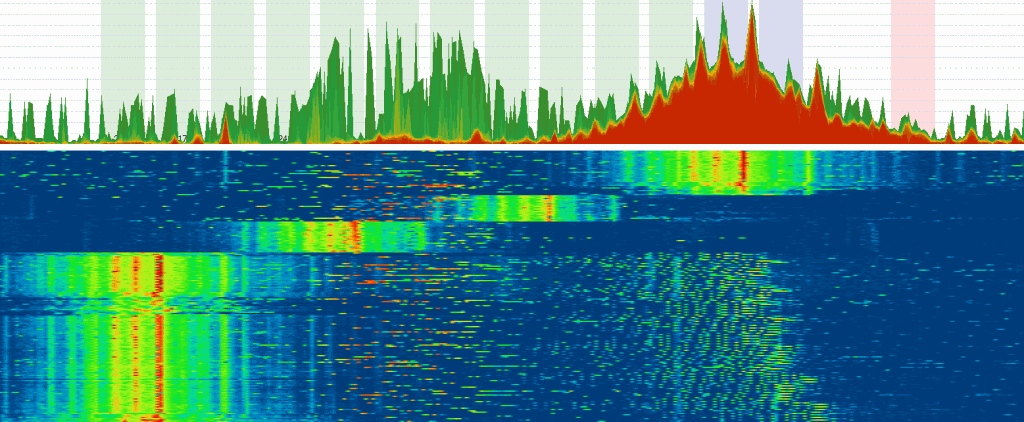
The quest for stable, high-speed Wi-Fi often leads us to troubleshooting issues with channel overlap and network congestion. However, a far more insidious and common problem is Radio Frequency (RF) interference—a form of invisible noise that can cripple connectivity, reduce speed, and introduce maddening lag. This noise is particularly prevalent in the 2.4 GHz frequency band, an unlicensed range that has become a digital battlefield where various devices, technologies, and neighbors compete for airtime.
Understanding the dynamics of the Wi-Fi RF spectrum is critical. Unlike the regulated lanes of the 5 GHz and 6 GHz bands, the 2.4 GHz range (2400-2500 MHz) is a public commons. Because this is an unlicensed frequency band, no special permits or strict requirements from telecommunications regulatory bodies are needed for transmission. Consequently, an increasing number of devices and legacy technologies use this band, leading to a phenomenon known as spectrum saturation, which results in significant noise and performance degradation for Wi-Fi users.
1. The Primary Culprits: Devices Causing RF Spectrum Interference
The problem in the 2.4 GHz band is the coexistence of multiple technologies that transmit data through the air, but do not necessarily use the Wi-Fi protocol (802.11). These devices generate what is known as non-Wi-Fi interference or "noise," which the Wi-Fi network interprets as background chatter, forcing it to slow down or retransmit data.
1.1 Non-Wi-Fi Interfering Technologies
The most common sources of continuous or high-intensity 2.4 GHz noise are:
- Wireless Surveillance Cameras (CCTV). Many legacy CCTV wireless video cameras and video broadcasters transmit image and sound using a continuous, unmanaged FM carrier signal operating in the 2.4 GHz band. These signals do not follow Wi-Fi politeness rules, often transmitting with the highest intensity possible and effectively jamming entire Wi-Fi channels.
- Baby Monitors. Wireless baby monitors, particularly older digital video models, are notorious noise generators. They flood the spectrum with continuous signals to maintain video feeds, heavily impacting Wi-Fi performance, especially in residential areas.
- Microwave Ovens. As a classic case study, microwave ovens emit high-intensity leakage in the 2.45 GHz range, which directly overlaps with Wi-Fi channels 6 to 11. When a microwave is active, it can momentarily destroy Wi-Fi connectivity for devices nearby.
- Bluetooth and IoT Protocols. While generally less aggressive, Bluetooth devices (802.15.1) and newer Internet of Things (IoT) protocols like ZigBee (802.15.4) and Thread also operate exclusively in the 2.4 GHz band. While they have sophisticated coexistence mechanisms, a large concentration of these devices can still contribute to overall spectrum saturation.
- Other Consumer Electronics. This category includes certain wireless phones (cordless handsets), older wireless microphones, and some car alarms that transmit telemetry data or signaling in the same range.
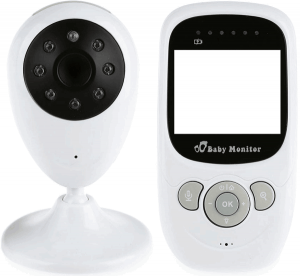
Wireless baby monitor: A significant source of continuous non-Wi-Fi noise.
1.2 Co-Channel and Adjacent Channel Interference (Wi-Fi on Wi-Fi)
Even friendly Wi-Fi networks can cause problems. Since the 2.4 GHz band only has three non-overlapping channels (1, 6, and 11), dense urban environments or large office buildings suffer from extreme congestion:
- Co-Channel Interference. This occurs when multiple Wi-Fi networks (from neighbors or multiple access points in a large office) operate on the same optimal channel (e.g., all using Channel 6). Devices must wait for each other to finish transmitting, leading to significant delays and reduced speed.
- Adjacent Channel Interference. This is worse. It happens when networks use channels that slightly overlap (e.g., using channel 5, which overlaps with both 1 and 6). This is particularly disruptive because the radio signals corrupt each other, forcing maximum data packet retry rate and making data transmission nearly impossible.
2. The Technical Impact of RF Interference on Network Performance
The presence of high-intensity, continuous noise—whether from a wireless CCTV camera or a microwave—negatively impacts the Wi-Fi network by forcing devices to use lower data rates, retransmit more frequently, and generally operate inefficiently. This results in observable user issues:
- Increased Data Packet Retry Rate. This is the primary mechanism by which performance decreases. When noise corrupts a data packet, the device must retransmit it. High noise means high retry rates, consuming airtime and bandwidth without successfully transmitting new data.
- Decreased Network Throughput (Speed). Since airtime is wasted on retries, the effective speed available for applications drops significantly. The network essentially stops working when a powerful interfering device (like a CCTV camera) is turned on.
- Increased Latency and Jitter. The delays caused by retries severely impact time-sensitive applications. This manifests as lag in online gaming, and excessive latency and jitter damage services like VoIP (Voice over Wi-Fi) and video conferencing.
- Packet Loss in VoIP/VoFi. In voice-over-IP communications, high interference can cause serious audio problems and disconnects because the system cannot handle the lost or delayed packets.
When a non-Wi-Fi signal generates a distinctive, continuous pattern in the spectrum, it can occupy a channel bandwidth of 32 MHz or more, effectively jamming all nearby Wi-Fi communications.
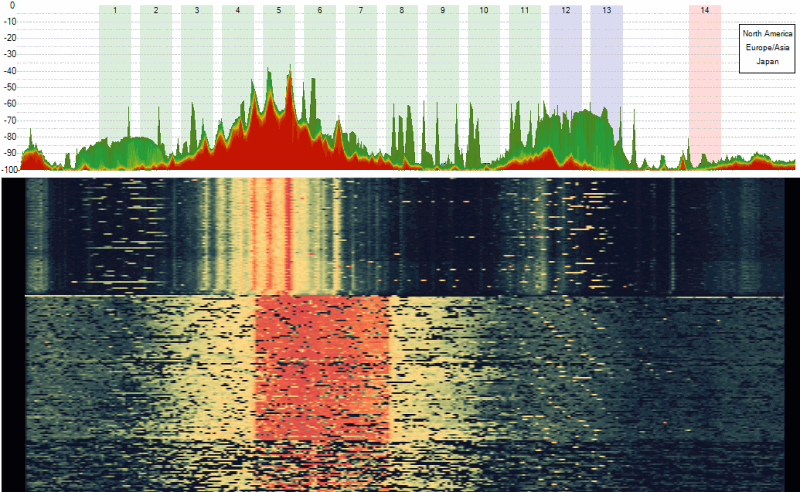
Wi-Fi network jamming by a powerful, continuous wireless CCTV camera signal.
3. Modern Solutions: How to Fix Wi-Fi Interference in 2025
Addressing RF interference requires a strategic, modern approach that prioritizes migration away from the highly congested 2.4 GHz band wherever possible.
3.1 The Primary Migration Strategy: 5 GHz and 6 GHz Bands
The most effective solution is to stop using the 2.4 GHz band for performance-critical devices (laptops, phones, streaming devices):
- Migrate to 5 GHz (Wi-Fi 5/6). The 5 GHz band offers significantly wider channels and is generally free of the non-Wi-Fi noise that plagues the 2.4 GHz band. Although it has shorter range, this is the recommended band for any device that requires speed and stability (e.g., home office equipment).
- Adopt 6 GHz (Wi-Fi 6E/7). For corporate environments and demanding smart homes, adopting hardware that supports 6 GHz (Wi-Fi 6E or Wi-Fi 7) is the ultimate fix. This band is considered greenfield spectrum—it has massive capacity and is completely free of all legacy 2.4 GHz and 5 GHz interference sources, offering unparalleled performance.
3.2 2.4 GHz Optimization and Troubleshooting
For legacy devices that must remain on the 2.4 GHz band (e.g., older IoT, some printers), specific optimization steps can minimize interference:
- Spectrum Analysis and Site Survey. To accurately diagnose the problem, perform an active or passive site survey and spectrum analysis. Specialized tools can visually identify the distinct patterns of non-Wi-Fi devices (like the continuous broadcast of a wireless video camera) and pinpoint the exact source and channel of the noise.
- Use Only Non-Overlapping Channels. If operating on 2.4 GHz, manually set your router to use only Channel 1, Channel 6, or Channel 11. Never use intermediate or overlapping channels (e.g., 2, 5, 8, 10), as this creates adjacent channel interference, which is the most destructive type of noise.
- Device Relocation or Replacement. If an interfering device is detected within your corporate or home network coverage area, it should be addressed:
- Replace the device with a modern Wi-Fi camera (IP camera) that uses the 5 GHz band, or a baby monitor that uses DECT technology (different frequency range).
- Change the operating channel of the interfering device (if configurable) to an unused part of the spectrum.
- Physically relocate the noisy device (e.g., move the microwave oven) further away from critical Wi-Fi Access Points.
- Increase Wi-Fi Power (Caution). While generally not recommended, increasing the transmit power on your Wi-Fi Access Point can sometimes help overcome a weak, localized noise source, but this also increases interference for neighboring networks.
As everyday technologies increasingly affect wireless networks, it is essential to monitor performance. If your network is not performing as expected, invest in spectrum analysis to measure and evaluate all network parameters and identify these hidden sources of radio frequency disruption.
Frequently Asked Questions (Interactive FAQ)
No, they are not immune. Wi-Fi 6 devices operating in the 2.4 GHz band still suffer from non-Wi-Fi noise (from microwaves, baby monitors) because that noise physically corrupts the radio signal before the Wi-Fi protocol can process it. Wi-Fi 6 only improves efficiency against other Wi-Fi devices using sophisticated scheduling (OFDMA), but not against non-Wi-Fi noise.
Neighbors' networks cause interference, primarily in the 2.4 GHz band, because they are likely using overlapping channels (adjacent channel interference) or too many networks are crowded onto the same non-overlapping channel (co-channel interference). This forces your devices to "wait their turn" to talk, drastically reducing your effective speed and increasing latency.
The most effective long-term solution is migrating performance-critical devices to the 6 GHz band (Wi-Fi 6E or Wi-Fi 7). This band is much wider, completely free of legacy devices (microwaves, baby monitors), and has dedicated spectrum for Wi-Fi use only, providing the best possible stability and speed.
Post a Comment for "Radio Frequency Warfare: Understanding, Identifying, and Solving Wi-Fi Interference in the Crowded 2.4 GHz Spectrum"